Every Watch Counts: Why "Watched" Is Not Enough

The movie may be the same, but the watch never is. The time, the place, the format and the reason you returned to it can all make each viewing different. That is why Filmsomniac treats every watch as something worth saving on its own.

A watched movie is not always just "watched"

Maybe you saw it in a theater. Maybe you rewatched it years later. Maybe you watched it with someone special. Maybe it became one of those films you return to every Christmas. Or maybe it was just a rough day and you needed some movie to comfort you. Whatever the case, a watch is not just a watch. It's an experience.

In Filmsomniac, a single watch is a first class citizen. Movie or episode is not just watched or not watched. You add a new watch every time you watch or rewatch a movie or episode. To paraphrase Harry Bosch: every watch counts, or no watch counts.

"Watched" tells you whether. A watch can tell you when, how, and sometimes also why. It can tell you that you saw a film in the cinema in 2014. It can tell you that later you rewatched it on Blu-ray. It can tell you that you only remember seeing it sometime in the 1990s. It can also hold a small note about that specific watch, if there's something more you want to remember. You can even write a full movie diary entry, if you want.

Adding a watch in Filmsomniac

If you rate or favourite a movie or an episode, it is also set as watched. This keeps things simple: if you are rating something, Filmsomniac assumes you have seen it. If you specifically set a movie as watched from the movie's page, a modal window opens asking more about the watch. You can set the watch a specific date and the format you watched it in. You can also write a short note about the watch. A note can be public or visible only to you.

All these are optional though. If you leave everything empty, Filmsomniac still records the date on which you added the watch. Filmsomniac also allows you to add only a partial watch date. If you remember just the year, you can set that. If you also remember the month, you can set year and month.

None of this additional information is required, though. A watch can remain as simple as marking something as watched, but the extra details are available whenever they matter to you.

Another way to mark films as watched is a single person's page. You can mark a film as watched faster on these pages. When you mark a film as watched there, the current date becomes the watch's addition date. Also rating or favouriting a movie on this page sets it also as watched.

Exploring your watches

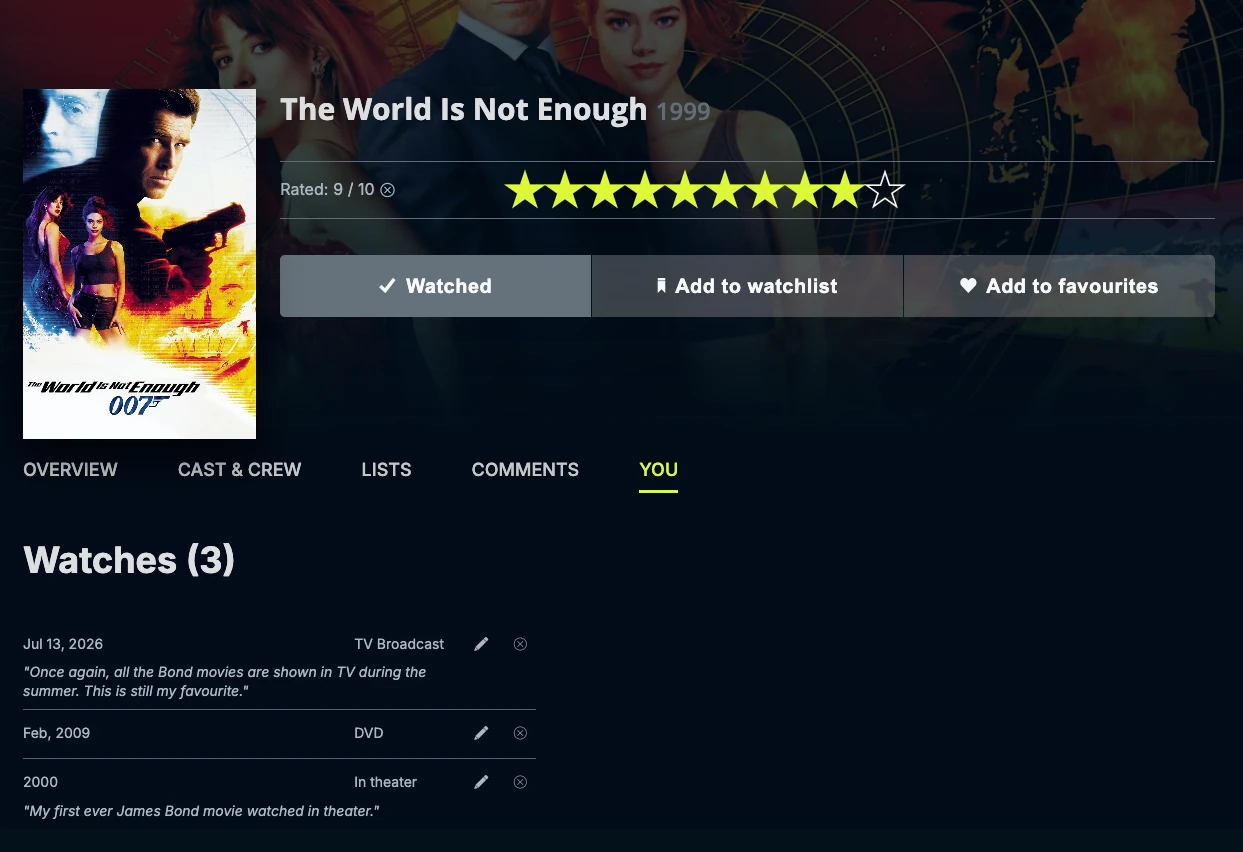
There are several pages in Filmsomniac where you can explore your watches. Every film has a tab called "You", which shows your watches of that film. If you added a specific watch date, format or wrote a note, they are all visible here. If you only marked the film as watched, the addition date is shown. "You" tab is also the only place where you can edit or delete a watch.

Filmsomniac You tab for James Bond: The World Is Not Enough

For episodes, each season has its own "You" tab containing all your watches of episodes from that season. The watches are grouped and sorted by watch year and month. When no watch date is available, Filmsomniac uses the addition year and month instead. An individual episode's "You" tab shows only your watches of that episode.

All your watches also appear on your Filmsomniac profile. Movie watches can be sorted by watch date, addition date, title or release year, and filtered by format or watch year and month. For episodes, you can sort by watch or addition date and filter by show, format, or watch year and month. You can view the results as posters, text, or a combination of both.

Some watches are ordinary. Some stay with you. Some become traditions, comfort watches or memories connected to a particular time or person. Filmsomniac lets you keep them as separate watches, because "watched" alone does not always tell the whole story.